Spring Boot + Spring Cloud 를 경험 하자
Spring 에서 제공 해주는 MSA 환경 구축 가이드를 경험하여 실력을 향상해 보자!
 Service Registration and Discovery
Learn how to register and find services with Eureka
Learn how to manage application settings from an external, centralized source
Learn how to route and filter requests to a microservice using Netflix Zuul
Learn how to degrade gracefully services using Hystrix
Client Side Load Balancing with Ribbon and Spring Cloud
Dynamically support services coming up and going down without interrupting the client
5가지 가이드를 학습하여 차례대로 Spring Cloud를 경험해 보자
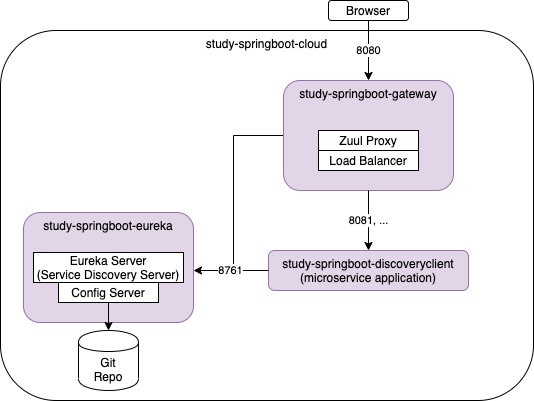
스프링에서 제공하는 가이드를 학습하면서 github에 commit별로 정리 하였습니다.
학습하다가 막힐 경우 commit내역을 참고 하면서 학습 하시길 바랍니다.
각 단계를 실시한 후 확인하기 위해 http/check-config.http로 확인 하였습니다.
https://github.com/kji6252/study-spring-cloud
1.Service Registration and Discovery
가이드대로 진행 한 후 eureka baseurl을 넣어 대비하는게 좋을거 같다
#discovery client의 application.yml에 추가
eureka:
  client:
    serviceUrl:
      defaultZone: http://localhost:8761/eureka/
2.Centralized Configuration
Eureka Server와 충돌을 피하기 위해 spring.cloud.config.server.prefix=/config를 추가
spring.cloud.config.server.prefix=/config
# study-springboot-eureka/config/example-app.properties 에 추가 한 뒤
# cd study-springboot-eureka/config/
# git init && git add. && git commit 하기

message=Remote Config!
3.Routing and Filtering
4.Circuit Breaker
study-springboot-discoveryclient를 stop 한 후에 실행하면 hystrixcommand에 명시된 fallback을 실행
5.Client Side Load Balancing with Ribbon and Spring Cloud
ribbon은 더이상 관리하지 않으므로 Spring Cloud Load Balancer로 예제가 바뀜
https://spring.io/guides/gs/spring-cloud-loadbalancer/
eureka와 통합하여 service discovery부분을 생략함